Sunday planning, weekday focus. Browse the 7-day meal plan, open the weekly shopping list and tick off what you’ve bought. During the week, open Today and tap “Today’s meal” to return to the meal for your current journey day. A little planning, one day at a time.
Beplan Sondag, fokus deur die week. Kyk deur die 7-dae maaltydplan, maak die weeklikse inkopielys oop en merk af wat jy gekoop het. Maak gedurende die week Vandag oop en tik op “Vandag se ete” vir jou huidige reisdag se maaltyd. Beplan ’n bietjie en vat dit dag vir dag.
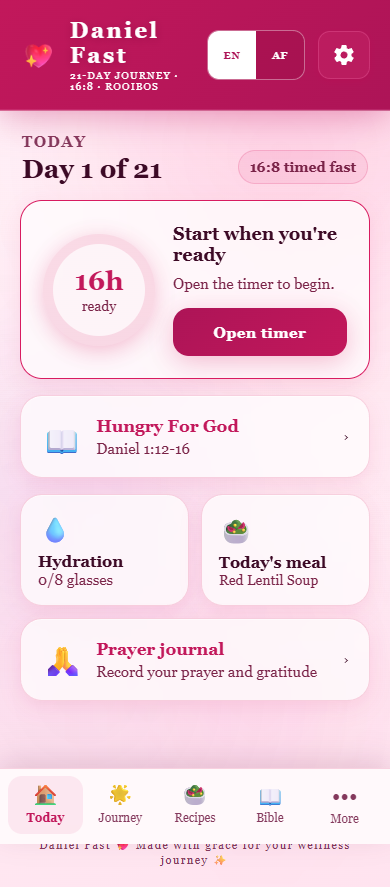
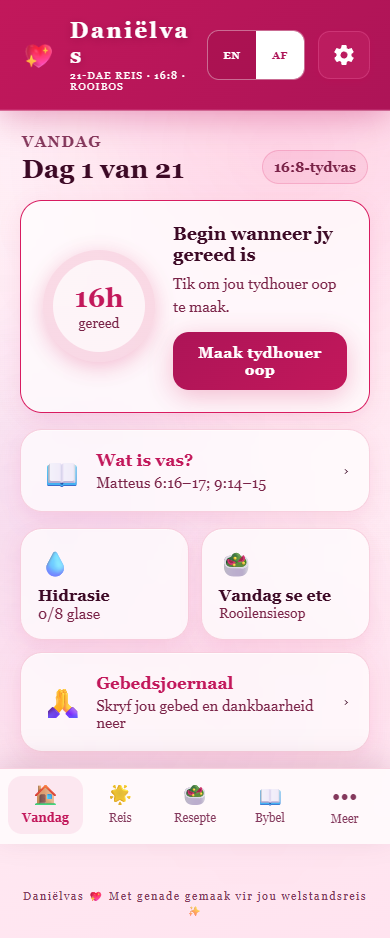
Demo screens in English and Afrikaans. Your journey day may differ.
Sunday: look ahead.
Open Recipes / Resepte and choose Day 2 / Dag 2 to browse the existing meal choices.


Check your cupboards. Tick your shopping.
Expand Weekly shopping list / Weeklikse inkopielys and tick off what you have bought.


Weekday: today’s focus.
Open Today / Vandag and tap Today’s meal / Vandag se ete. This returns to the meal for your current journey day, rather than the day you last browsed.
A few useful details
The app repeats a seven-day meal plan according to journey progress. Sunday is simply a useful planning occasion; it does not trigger an automatic reset. Shopping quantities are per recipe, × indicates repetitions, and similar ingredients can appear separately.
Shopping ticks carry forward until you choose the new-week reset yourself. Inkopiemerkies bly staan totdat jy self die nuwe-week-herstel kies.
The Today screen also contains fasting and timer features. This demonstration does not recommend a fasting schedule or claim medical or weight-loss benefits. It does not demonstrate automatic ordering or personalised meal generation.